LLM Providers
The LLM Providers page allows administrators to manage the availability of LLM providers across the entire LLM Gateway deployment. Each provider can be individually enabled or disabled, giving you centralized control over which providers are accessible to all projects.
Role access: Super Admin and Admin can enable and disable providers. Auditor has read-only access. Project Manager and User do not have access to this page.
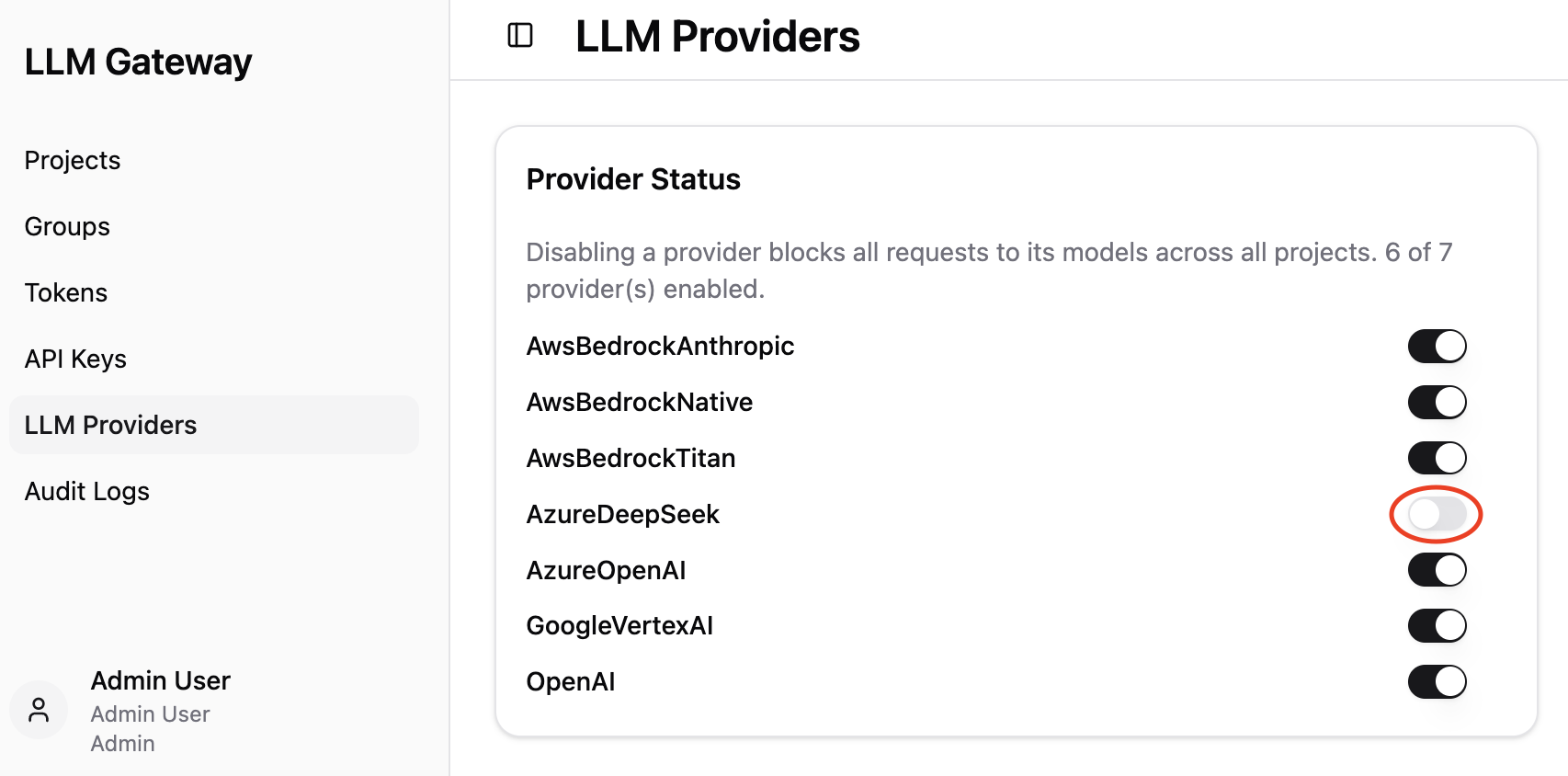
Provider Status
The Provider Status card displays all LLM providers configured in LLMGW along with their current state.
Each provider is listed with a toggle switch:
- Enabled (toggle on) — requests to this provider's models are allowed,
- Disabled (toggle off, highlighted by red circle in the image above) — all requests to this provider's models are blocked across all projects.
Note: Disabling a provider blocks all requests to its models across all projects. This is a global setting and overrides any project-level model access configuration.
Toggling a Provider
To enable or disable a provider, click its toggle switch. The change takes effect immediately.
Note: Before disabling a provider, consider that any active projects relying on that provider's models will immediately lose access to them.
Model Residency
When a preferred data boundary is set in the config (residency.preferred, e.g. eu), the page
also shows where each model processes data and whether it stays inside that boundary. See
Model Residency for how this is configured and classified.
If no preferred boundary is set, the compliance verdicts and the mix summary are hidden; only the per-model residency label is shown.
Residency label
Each model has a residency label describing the region it is confined to:
| Label | Meaning |
|---|---|
Global |
Processing can happen in any region. |
EU (multi-region) |
Confined to the EU zone (no single country). |
US (multi-region) |
Confined to the US zone. |
APAC (multi-region) |
Confined to the APAC zone. |
<Country> region |
A single region in one country (e.g. Sweden region). |
Unknown |
The gateway could not place the model. |
Compliance verdict
When a boundary is configured, each provider row shows a badge, and expanding a provider shows a Compliant column per model. There are three outcomes:
| Verdict | Model column | Meaning |
|---|---|---|
Compliant (EU resident) |
Yes | The model's boundary matches the preferred one. |
| Not Fully Compliant | No | The model can leave the boundary (global, or a known other region such as US or GB). |
| Unknown | Unknown | The gateway could not place the model (e.g. missing config). |
The provider badge rolls its models up: compliant only when all models are compliant, not compliant if any model can leave the boundary, unknown otherwise.
The row also shows a short mix summary of its models, e.g. 3 models · 1 EU · 1 US · 1 unknown.