Audit Logs
The Audit Logs page provides comprehensive tracking of all system activities across your LLM Gateway deployment. This global audit trail allows administrators to monitor user actions, system events, and security-related activities with detailed filtering and search capabilities.
Role access: Super Admin, Admin, and Auditor can view all audit logs. Project Manager sees only logs for entities they own. User has no access to this page.
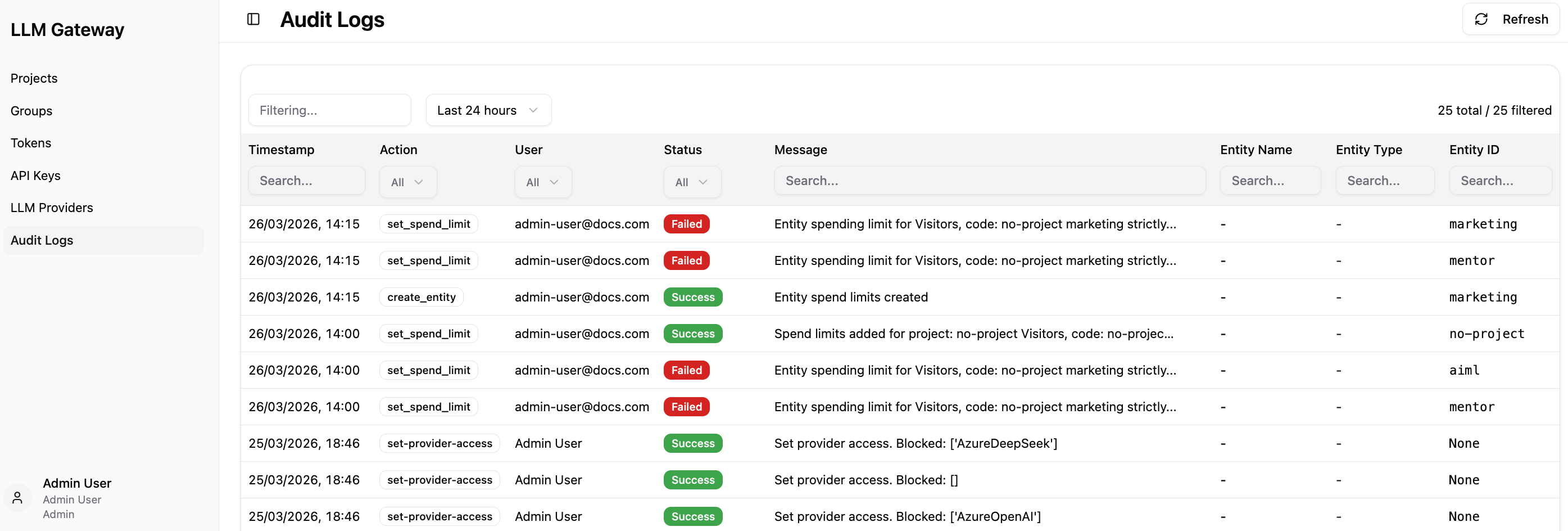
Audit Log Table
The main audit log table provides detailed information for each logged event:
-
Timestamp - Exact date and time when the action occurred,
-
Action - Type of action performed (e.g., create-entity, add-spend-limits),
-
User - Email address of the user who performed the action,
-
Status - Operation result with visual indicators (Success in green, Failed in red),
-
Message - Description of the action and its outcome,
-
Entity Name - Name of the affected entity when applicable,
-
Entity Type - Type of entity affected,
-
Entity ID - Unique identifier of the affected entity.
Each of these columns provides a filtering option based on the column you are searching through. The top search bar allows you to perform a global search across all columns. You can also filter logs by selecting a time range in dropdown menu next to it.
This centralized audit logging system ensures complete visibility into all LLM Gateway activities, supporting security monitoring, compliance requirements, and operational troubleshooting across your entire deployment.