User groups
The Groups page provides overview over user groups within your LLM Gateway deployment. You are able to create and delete groups here, but any changes and management are done via Azure Entra ID.
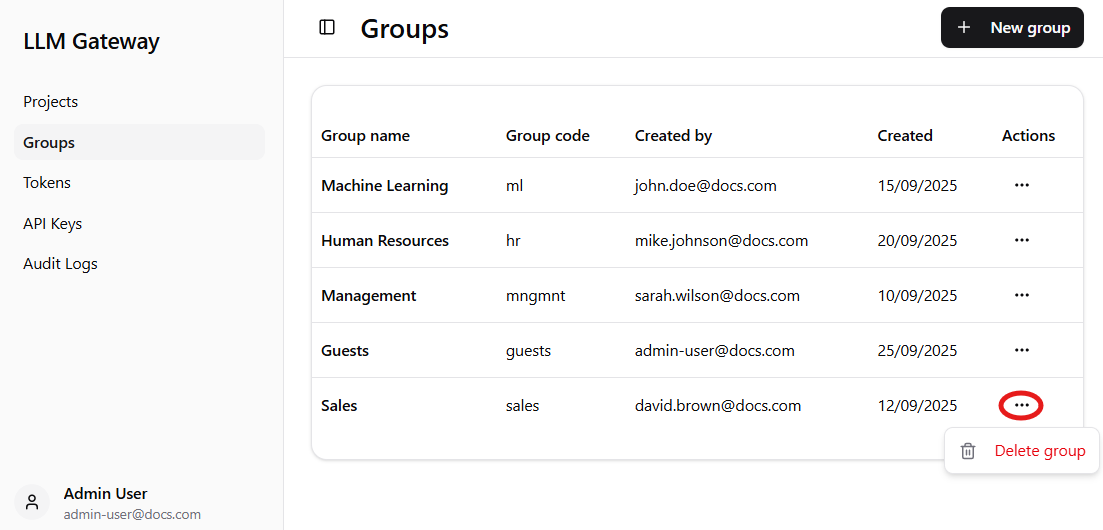
Note: After clicking on three dots (highlighted by red circle) menu where you can delete the group will appear.
Dashboard Components
The main groups table provides detailed information for each group:
-
Group name - Human-readable name for the group,
-
Group code - Unique identifier code for programmatic access,
-
Created by - Email address of the administrator who created the group,
-
Created - Date when the group was created,
-
Actions - Three-dot menu providing access to group-specific operations such as deletion.
Group Management Features
Creating New Groups
- Click the
+ New groupbutton in the top-right corner to create new groups, - Configure group name and code during the creation process,
- Group membership and permissions are managed through Azure Entra ID.
Group Configuration
When creating a new group, you need to provide:
- Group name - Descriptive name for the group,
- Group code - Unique programmatic identifier.
Important: Group names and codes must match with existing groups in Azure Entra ID, as they are imported via configuration files. In future versions, this will be replaced with a dropdown menu for easier group selection.
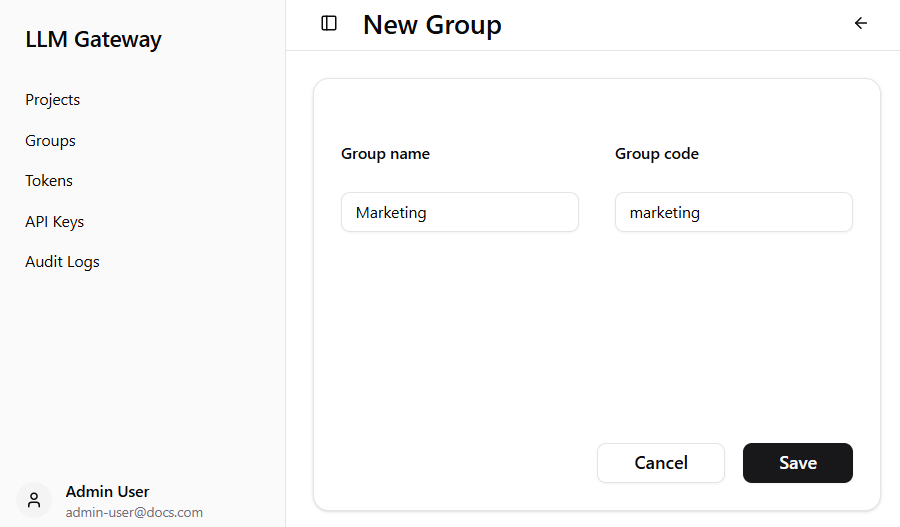
This interface allows you to register existing Azure Entra ID groups for use in project spend limits and access controls. Group names and codes must match exactly with groups already configured in Azure Entra ID, ensuring seamless integration with your organization’s identity management system.